

Sign in for the first time
To use the app you first tell it which organization you belong to, then sign in. This article walks through both steps.
Open the app and choose your organization
Section titled “Open the app and choose your organization”When you open the app without a saved organization, you land on a welcome page headed Choose your organization to sign in. There are a few ways to get to your sign-in screen:
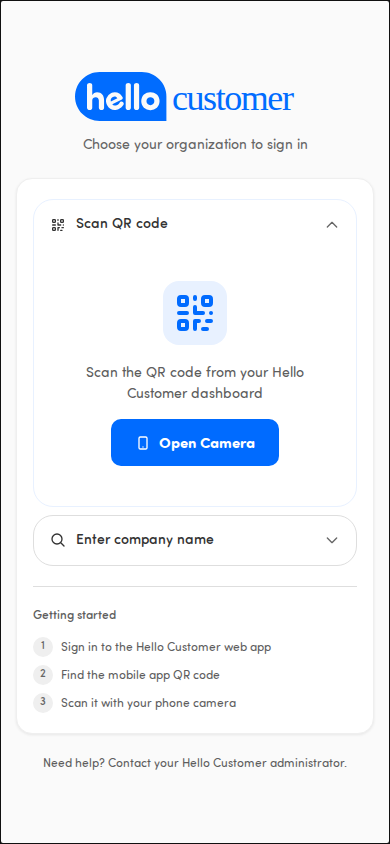
Scan the QR code
Section titled “Scan the QR code”Tap Scan QR code and point your phone’s camera at the mobile-app QR code from the Hello Customer web app. This is the quickest path on a phone.
Enter your company name
Section titled “Enter your company name”Tap Enter company name and type your organization’s name. The app looks it up and takes you to the sign-in screen.
Pick a recent organization
Section titled “Pick a recent organization”If you’ve signed in before, recent organizations appear at the top of the page so you can tap one and skip straight ahead. (When recent organizations are shown, the other options sit under a divider reading or use another method.)
Use a direct link
Section titled “Use a direct link”Once you’ve connected an organization before, a Use direct link option also appears. Tap it to open your organization without scanning the QR code again.
⚠️ If the name you typed doesn’t match an organization, the field shows Organization not found. Please check the name and try again. If a QR code or direct link fails, the page shows Unable to verify access. Please try again. — use the sign-in options on the page to retry. If it keeps failing, the footer reminds you: Need help? Contact your Hello Customer administrator.
Sign in securely
Section titled “Sign in securely”Once your organization is set, you reach the sign-in screen. The heading reads Sign in to followed by your organization’s name. Tap Sign in with Hello Customer — a note tells you You’ll be redirected to sign in securely.
You’ll be taken to your organization’s secure single sign-on page to enter your credentials, then returned to the app and dropped straight into the Feed.
First time? Get your QR code from the web app
Section titled “First time? Get your QR code from the web app”As long as you have no recent organizations yet (your very first sign-in, or after clearing your browser data), the welcome page shows a short Getting started checklist:
- Sign in to the Hello Customer web app
- Find the mobile app QR code
- Scan it with your phone camera
Once you’ve scanned it once, your organization is remembered, so next time you can pick it from the recent list.
Switch to a different organization
Section titled “Switch to a different organization”On the sign-in screen, tap Not your organization? to go back and choose a different one.