

About alerts
Alerts is an upcoming add-on that will tell you when something in your customer feedback needs your attention, like a metric crossing a threshold or a trend moving the wrong way.
ℹ️ Alerts isn’t released yet. It’s coming in an upcoming release. Today the tab in the bottom bar is called Notifications, and its page is titled Shared with you — see Review feedback shared with you.
What Alerts will do
Section titled “What Alerts will do”When the Alerts add-on ships and your organization enables it, your Notifications tab will be renamed Alerts. Alongside the feedback colleagues forward to you, you’ll get automated alerts: for example, when a score crosses a threshold you care about, or when a metric trends in a direction worth a closer look. There’s no extra setup on your side — the alerts simply start appearing in that tab.
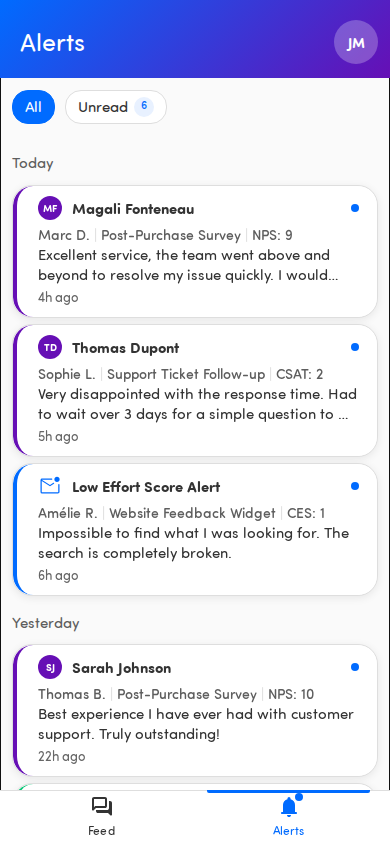
System alerts
Section titled “System alerts”Some alerts don’t come from a rule anyone set up — Hello Customer raises them itself when something about your account needs attention. They arrive in the same place as any other alert, marked with a warning icon, and you read or dismiss them the same way.
Today there is one: a heads-up as your organization’s verbatim usage approaches its plan limit, and a second one once the limit is actually reached. Once the limit is hit, new feedback is no longer scored or categorised until it’s resolved — so it’s worth passing on to whoever manages your account.
Like every other alert, these appear in the app once your organization has the Alerts add-on enabled. Your administrators are e-mailed about verbatim usage either way.
What you can do today
Section titled “What you can do today”Until Alerts arrives, the Notifications tab (page titled Shared with you) shows the feedback colleagues forward to you. You can:
- See and open feedback shared with you (see Review feedback shared with you).
- Filter by All or Unread.
- Dismiss and restore items (see Dismiss and restore items).