

Explore top categories and sentiment
The Top Categories card shows what customers are talking about: the categories mentioned most often, ranked, so you can see what’s driving the score.
ℹ️ Available with the Insights add-on. If you don’t see the Insights tab, your organization hasn’t enabled this feature — ask your administrator.
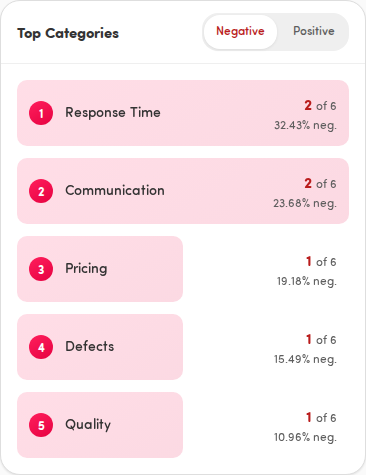
Switch between negative and positive
Section titled “Switch between negative and positive”The card opens on Negative. Use the toggle in the card header to switch:
- Negative — the topics behind unhappy feedback.
- Positive — the topics behind happy feedback.
Read a category row
Section titled “Read a category row”Each row, from top, is ranked 1, 2, 3… by how often it’s mentioned. For each category you’ll see:
- The category name.
- The mention count for the selected sentiment, shown as a number next to of the total mentions (for example 42 of 318).
- The percentage of mentions, marked neg. or pos. depending on the toggle.
- A progress bar behind the row, sized relative to the most-mentioned category, so the leaders stand out.
Open a category for the full breakdown
Section titled “Open a category for the full breakdown”Tap any category to open its detail sheet. The Sentiment breakdown shows all five sentiment levels — Very Positive, Positive, Neutral, Negative, and Very Negative — as a coloured bar and a list with counts and percentages, plus the total mentions overall.
Swipe the sheet down, tap the X, or tap outside it to dismiss.
When there’s nothing to show
Section titled “When there’s nothing to show”If there are no categories for the selected sentiment and touchpoint, the card shows No categories found. Try the other toggle, or switch to a touchpoint with more feedback.