

Welcome to the Hello Customer mobile app
The Hello Customer mobile app puts your customers’ feedback in your pocket. It’s built for managers and frontline staff who want to stay on top of what customers are saying, on a phone, between other things.
What the app is for
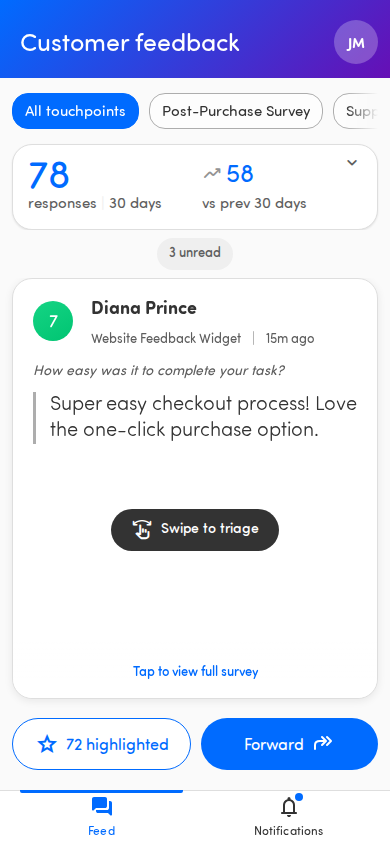
Section titled “What the app is for”Most of your time in the app is spent reading. You swipe through recent customer responses, see how each one scored, and open the ones that matter. Depending on what your organization has switched on, you can also reply to customers, forward feedback to a colleague, and view score and category insights.
The feed: swipe through feedback
Section titled “The feed: swipe through feedback”The home screen is the Feed, a stack of cards with one customer response per card. You move through them like a deck:
- Swipe right to go to the next response. This marks it as viewed.
- Swipe left to go back to the previous response.
- Tap a card to open the full survey response and read every answer.
- Highlight (star) a response to flag it as important.
- Forward a response to a colleague.
💡 The first time you sign in, a short welcome tour explains the basics. You can replay it any time from Settings — see Take the welcome tour.
A quick tour of the tabs
Section titled “A quick tour of the tabs”A bar at the bottom of the screen has up to three tabs:
- Feed — Swipe through recent customer feedback. This is the home screen.
- Insights — Scores, top categories, and AI recommendations for the last 30 days. Only appears if your organization has the Insights add-on.
- Notifications — Feedback that colleagues have shared directly with you (page titled Shared with you). A small dot shows when there’s something unread.
To reach Settings, tap your avatar in the top corner of the page header. That’s where you change the app theme, manage notifications, and replay the welcome tour.

It’s a web app you can install
Section titled “It’s a web app you can install”The app runs in your phone’s browser, but you can install it to your home screen so it opens full-screen like any other app. It also works offline, so cached feedback is still readable when you lose signal. The app offers to install itself after you sign in. See Install the app on your phone.
Some features depend on your organization
Section titled “Some features depend on your organization”Not everyone sees the same thing. Close the Loop (in-app replies) and Insights are add-ons your organization chooses to enable (with Alerts planned for later). If an article here describes something you don’t see, your organization probably hasn’t switched it on — ask your administrator.
You’ll also only see feedback for the touchpoints you’ve been given access to.