

View your Insights dashboard
The Insights dashboard turns your customer feedback into a quick read of how a touchpoint is doing: the headline score, how many people responded, which topics come up most, and suggested actions.
ℹ️ Available with the Insights add-on. If you don’t see the Insights tab, your organization hasn’t enabled this feature — ask your administrator.
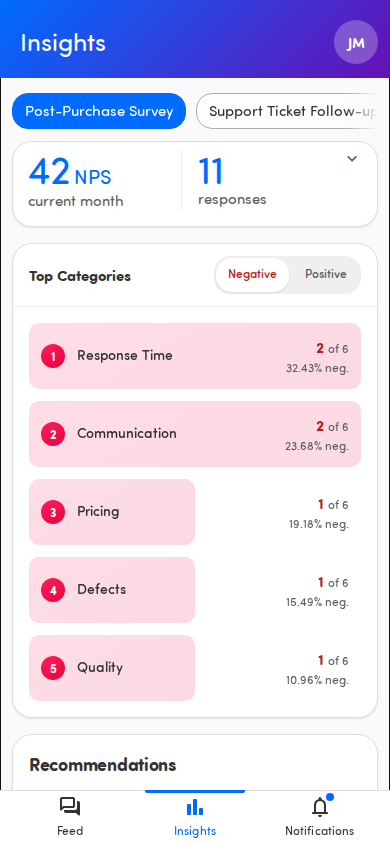
Open Insights
Section titled “Open Insights”Tap Insights (the bar-chart icon) in the bottom navigation.
ℹ️ The Insights tab appears whenever your organization has the add-on. You’ll see No touchpoints available with the message Contact your administrator to get access. if you don’t yet have access to any touchpoint’s analytics. Ask your administrator if you expect to see data here. See Why don’t I see Insights, Close the Loop, or alerts?.
What the dashboard shows
Section titled “What the dashboard shows”From top to bottom:
- Score banner — the headline score, its metric (for example NPS), and the number of responses, with an up/down change versus the previous period. See Read the score and response banner.
- Top Categories — the topics mentioned most often, ranked, with a Negative/Positive toggle. See Explore top categories and sentiment.
- Recommendations — auto-generated suggested actions. See AI recommendations.
Choose which touchpoint to view
Section titled “Choose which touchpoint to view”Below the Insights header is a row of touchpoint chips, one per touchpoint you can view. Tap a chip to switch the whole dashboard to that touchpoint. The dashboard opens on your first touchpoint automatically.
See Filter Insights by touchpoint and date range.
Refresh the data
Section titled “Refresh the data”Pull down on the dashboard to refresh. The page reloads the score, categories, and recommendations for the touchpoint you’re viewing.