

Read the score and response banner
The banner at the top of the Insights dashboard is the headline read on a touchpoint. It shows how the touchpoint is scoring, how many people responded, and whether that’s up or down.
ℹ️ Available with the Insights add-on. If you don’t see the Insights tab, your organization hasn’t enabled this feature — ask your administrator.
The score and metric
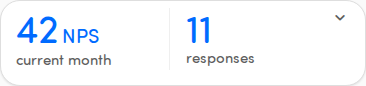
Section titled “The score and metric”On the left, the large number is the score, with its metric name beside it — for example NPS, CSAT, or CES. The label below reads current month.
The metric tells you how to read the number:
If there’s no score to show yet, the banner shows a dash (—).
The response count
Section titled “The response count”On the right, the large number is how many responses are included, labelled responses.
See the change versus the previous period
Section titled “See the change versus the previous period”Tap the banner to expand it. It compares the current period with the one before it:
- A small up or down indicator shows how much the score and the response count moved. A rising value shows a + and an upward trend; a falling value shows a downward trend. A value that didn’t move at all shows no indicator.
- Below that, the previous figures appear, labelled vs previous month for the score and responses for the count.
Tap the banner again to collapse it. Switching to a different touchpoint collapses it automatically.